WhatsApp is introducing one of the most anticipated features in its history native multi-account support on a single iPhone. For years, iOS users have been requesting an integrated way to manage two WhatsApp numbers without relying on workarounds, third-party apps, or the WhatsApp Business alternative. Now, with Meta releasing a new WhatsApp beta build on TestFlight, that long-awaited moment has finally arrived.
This detailed and fully updated guide breaks down everything you need to know about the new feature: how it works, what it changes, why it matters, and how it will reshape the WhatsApp experience for millions of users globally. Whether you use WhatsApp for business, personal communication, or both, this feature is set to transform how you interact across your accounts.
What Multi-Account Support Means for WhatsApp Users
For the first time, WhatsApp users on iPhone will be able to log into multiple WhatsApp accounts within a single app environment, switching between them with just a tap. This update eliminates the need for:
A second iPhone
A cloned app
The WhatsApp Business app
The Companion Mode workaround
Complex dual-SIM setups
Instead, WhatsApp now offers an official, smooth, and consistent multi-account management system, placing iOS users on equal footing with Android users who have long enjoyed device-level app cloning tools.
WhatsApp Beta Confirms Multi-Account Support for iPhone
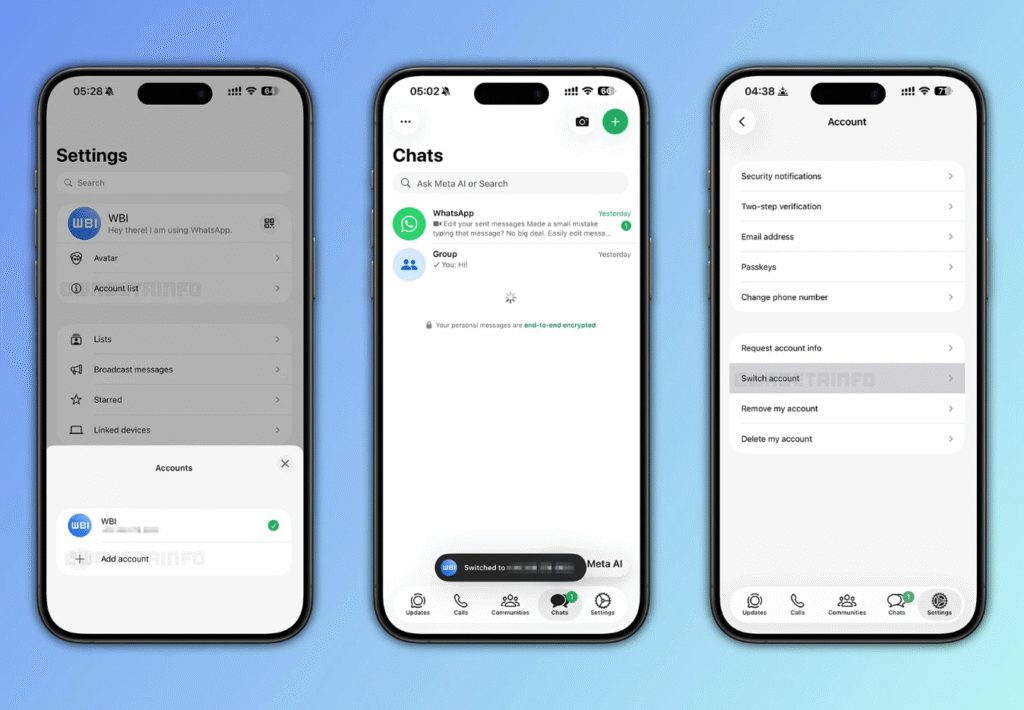
The update first surfaced through the WhatsApp TestFlight beta platform, where a select group of users gained access to the new functionality. Reports from WABetaInfo the most reliable source for WhatsApp insider updates confirmed:
“Some beta testers can now add and switch between multiple accounts directly from the app’s settings menu.”
This is the strongest indication yet that Meta is finalizing the development of a multi-account feature designed to integrate seamlessly into WhatsApp’s existing interface. Early testers describe it as polished, stable, and clearly engineered with long-term usage in mind.
How WhatsApp’s Multi-Account System Works on iPhone
WhatsApp’s implementation focuses on simplicity, clarity, and organization ensuring that users can juggle conversations across accounts without confusion or technical complexity.
A New “Account List” Section in WhatsApp Settings
WhatsApp’s interface now includes a dedicated new panel called Account List, which acts as the hub for managing multiple accounts. Through this panel, users can:
Add accounts
Remove accounts
Switch between accounts instantly
View and configure account-specific settings
It can be accessed in two ways:
From WhatsApp’s Settings page
Via a new shortcut button beside the QR code icon
This design mirrors the multi-account support users already enjoy on other Meta platforms like Instagram and Facebook, creating a unified experience across apps.
WhatsApp Currently Supports Two Accounts on iPhone
In its beta phase, WhatsApp allows users to add up to two accounts per device. This limit may expand in the future, but even two accounts mark a major milestone, especially for:
Entrepreneurs managing customer inquiries
Professionals separating work and personal communication
Travelers juggling international numbers
Dual-SIM users tired of switching devices
Meta has designed multiple flexible methods for adding an account:
Ways to Add Additional WhatsApp Accounts on iPhone
1. Create a Brand-New WhatsApp Account
You can register a completely new phone number even one that has never been used on WhatsApp before.
2. Add an Existing WhatsApp Account
If you have an account previously used on:
WhatsApp Business
Another iPhone
An Android device
…you can add it instantly.
3. Link an Account Using Companion Mode (QR-Code Login)
Users who prefer WhatsApp’s multi-device ecosystem can add a companion account simply by scanning a QR code.
This method ensures:
Instant syncing
Complete mirroring of conversations
Transfer of settings and preferences
Secure authentication
Each WhatsApp Account Maintains Independent Settings
One of the most powerful aspects of WhatsApp’s multi-account support is that each account comes with its own unique environment. Nothing overlaps, and no data gets mixed. Every account keeps its own:
Chat history
Privacy preferences
Backup settings (iCloud independent for each account)
Notification tones
Custom wallpapers
Block lists
Two-factor authentication
Media auto-download preferences
This separation is especially beneficial for users who want a clear boundary between professional and personal spaces.
Clear Account Labels in iPhone Notifications
To avoid confusion when multiple WhatsApp accounts are active, WhatsApp has implemented account-specific notification labels. Each incoming alert will clearly display:
Which WhatsApp account received the message
The sender’s name or group name
The profile icon tied to that account
This is essential for accuracy, privacy, and productivity ensuring you never accidentally respond from the wrong account or mix up business and private chats.
Why WhatsApp Multi-Account Support Matters More Than Ever
With WhatsApp serving over 2 billion users, multi-account support addresses a global demand that has existed for years. iPhone users, in particular, faced major limitations due to Apple’s restrictions on cloning apps. This update dramatically changes that landscape.
1. Enhances Work-Life Balance
Users can finally maintain a clean separation between personal relationships and business obligations.
2. Boosts Productivity for Small-Business Owners
Entrepreneurs can:
Manage customer chats
Maintain support lines
Operate with a separate business number
…without needing WhatsApp Business.
3. Eliminates the Need for Multiple Apps
WhatsApp Business becomes optional rather than essential.
4. Ideal for Travelers
Tourists and expats who use international SIMs get seamless access to multiple WhatsApp identities.
5. Improves Device Efficiency
Managing two accounts in one app reduces:
Storage usage
Background data consumption
Battery drain
App switching fatigue
How Multi-Account Support Plays Into WhatsApp’s Future Vision
WhatsApp is evolving rapidly, moving beyond its original phone-number-centric design. Multi-account support fits into a larger ecosystem upgrade that includes:
1. Username Support (Coming Soon)
WhatsApp plans to let people connect using usernames instead of phone numbers.
2. Password-less Login Options
Meta is aligning WhatsApp with modern authentication standards.
3. Cross-Device Synchronization
WhatsApp’s multi-device support is getting more powerful and secure, allowing more devices per account.
4. End-to-End Encryption Enhancements
New privacy controls will improve security even with multiple accounts active.
These innovations show WhatsApp’s goal of becoming a more flexible, user-centric communication hub.
When Will WhatsApp Multi-Account Support Be Released?
While WhatsApp has not provided an official launch date, the feature appears nearly complete based on:
Stable performance in beta
Fully functional interface
Detailed account-specific controls
Widespread early access
Historically, WhatsApp’s beta features move into public release within weeks or a few months once they reach this level of refinement.
A full global rollout is expected soon, likely in an upcoming major update.
How to Prepare Your iPhone for WhatsApp Multi-Account Support
To ensure a smooth transition when the feature officially launches, users should take the following steps:
1. Update to the Latest Version of WhatsApp
Beta or stable—keeping the app updated ensures compatibility.
2. Install the Latest iOS Version
New features often require updated system frameworks.
3. Configure Dual SIM Settings
If you use two numbers, ensure both are active and properly configured.
4. Back Up Your WhatsApp Chats
Use iCloud for secure backup and restore options.
5. Join the WhatsApp TestFlight Program
If slots open, you can gain early access to new features before the public.
Final Thoughts: A Breakthrough Feature for iPhone Users
WhatsApp’s decision to bring multi-account support to the iPhone marks one of the platform’s most important updates of the last decade. For everyday users, professionals, business owners, and travelers, the ability to manage multiple WhatsApp identities within one app will dramatically improve convenience, privacy, and efficiency.
With unique account environments, clear notification labels, seamless switching, and secure syncing options, this feature lays the groundwork for a more advanced and customizable WhatsApp ecosystem. As Meta continues to modernize WhatsApp’s infrastructure, multi-account support is a major milestone one that brings iPhone users the flexibility they have been requesting for years.
WhatsApp is moving toward a future where managing digital identities across devices is effortless, secure, and intuitive and this update is a major step in that direction.
The internet has changed the way we live work and learn. Today, AI-Powered Web Browsing is taking that change even further. Instead of simply typing keywords and scrolling through pages of links users now experience smarter faster, and more accurate results. AI-Powered Web Browsing uses advanced algorithms to understand what users mean not just what they type. As a result online search feels less like a task and more like a conversation.
Over the past decade search engines have grown more intelligent. However, AI-Powered Web Browsing goes beyond basic search improvements. It analyzes behavior, context and preferences to deliver highly relevant information in seconds. This shift isn’t just convenient; it’s revolutionary. In this article we’ll explore how AI-Powered Web Browsing works why it matters and what the future holds.
If you want to boost your productivity, don’t miss our detailed guide on 7 Powerful Windows 11 Start Menu Features You Should Be Using Today to unlock hidden tools and smarter navigation options.
At its core AI-Powered Web Browsing combines artificial intelligence with traditional web search technologies. Unlike older systems that rely heavily on keyword matching this approach uses machine learning and natural language processing to understand user intent.
Traditional search engines scan indexed pages and rank them based on keywords and backlinks. While effective this method often misses context. For example, a search for best bank could mean a financial institution or the side of a river. AI-Powered Web Browsing examines surrounding words, past searches and user behavior to clarify meaning.
The Technology Behind AI-Powered Web Browsing
Several technologies power AI-Powered Web Browsing:
Machine Learning (ML): Learns from user interactions and improves results over time.
Natural Language Processing (NLP): Understands human language in a conversational way.
Neural Networks: Detect patterns and relationships in large data sets.
Predictive Analytics: Anticipates what users may search for next.
These systems work together to refine search accuracy. For instance NLP helps interpret complex questions, while ML adapts results based on feedback. This layered approach ensures that AI-Powered Web Browsing continues to improve with every interaction.
How AI Interprets User Intent
Understanding intent is central to AI-Powered Web Browsing. Instead of focusing only on words AI analyzes:
Search history
Location data
Device type
Time of day
Previous clicks
By combining these signals AI can determine whether a user wants to buy learn compare or solve a problem. Consequently results become more relevant and personalized. It’s almost like having a digital assistant who knows what you’re thinking.
Key Benefits of AI-Powered Web Browsing
The rise of AI-Powered Web Browsing brings many advantages. These benefits affect individuals, businesses, and entire industries.
First and foremost speed improves dramatically. AI filters irrelevant information before users even see it. Secondly accuracy increases because AI considers context. Thirdly personalization ensures that no two users receive identical results.
Smarter Search Results in Real Time
One major strength of AI-Powered Web Browsing is real-time adaptation. Search engines now adjust rankings instantly based on trends and user engagement.
For example:
Feature
Traditional Search
AI-Powered Web Browsing
Keyword Matching
Primary method
Context + semantics
Personalization
Limited
Advanced
Real-Time Updates
Periodic
Continuous
Conversational Queries
Basic
Highly advanced
This dynamic system ensures that users receive up-to-date and meaningful content. As trends shift AI adapts immediately.
Enhanced Productivity for Users
Time is valuable. AI-Powered Web Browsing helps users save it. Features such as auto-suggestions summarized answers and predictive typing reduce effort.
Students can research topics faster. Professionals can gather data quickly. Businesses can analyze competitors more efficiently. In short AI-Powered Web Browsing turns hours of searching into minutes.
Moreover AI tools now summarize long articles highlight key points and even compare products side by side. That’s not just helpful—it’s a game changer.
AI-Powered Web Browsing in Everyday Life
Many people interact with AI-Powered Web Browsing daily without realizing it. From online shopping to streaming recommendations AI shapes digital experiences.
In e-commerce AI suggests products based on browsing habits. In education, it recommends learning materials suited to a student’s pace. In healthcare it helps users find reliable medical information quickly.
Voice and Conversational Search
Voice assistants rely heavily on AI-Powered Web Browsing. Instead of typing, users can ask full questions like What’s the best Italian restaurant nearby?
AI processes speech identifies intent and delivers precise answers. This conversational style makes browsing feel natural. As voice recognition improves more users are shifting away from traditional typing.
Mobile and Smart Device Integration
Smartphones tablets and smart home devices all benefit from AI-Powered Web Browsing. AI syncs preferences across devices creating a seamless experience.
For instance you might search for travel deals on your laptop and later receive related suggestions on your phone. This level of integration reflects how AI-Powered Web Browsing adapts to modern lifestyles.
Challenges and Ethical Considerations
Despite its benefits AI-Powered Web Browsing isn’t without challenges. Privacy concerns remain at the forefront. Since AI relies on user data, transparency is essential.
Bias is another issue. If AI systems are trained on biased data results may reflect unfair patterns. Therefore, developers must prioritize fairness and accountability.
Data Security and Trust
Trust is critical for the success of AI-Powered Web Browsing. Companies must:
Protect user data with strong encryption
Provide clear privacy policies
Offer opt-out options
Regularly audit AI systems
By following ethical guidelines organizations demonstrate Experience Expertise Authoritativeness and Trustworthiness. These E-E-A-T principles ensure long-term credibility.
The Future of AI-Powered Web Browsing
Looking ahead AI-Powered Web Browsing will become even more predictive. Instead of waiting for users to search AI may suggest actions before a query is typed.
Imagine opening your browser and seeing personalized updates tailored to your schedule. That’s the direction AI is heading. Predictive browsing could transform productivity and decision-making.
Emerging trends include:
Hyper-personalized search experiences
Visual and image-based search enhancements
Real-time language translation
Integration with augmented reality
As these innovations develop AI-Powered Web Browsing will redefine how humans interact with information.
Preparing for an AI-Driven Web
To adapt users should strengthen digital literacy skills. Understanding how AI works empowers individuals to use it responsibly.
Businesses meanwhile must optimize content for AI systems. Clear structure, authoritative information and user-focused design will remain essential.
The key is balance. While AI-Powered Web Browsing automates many tasks human judgment still matters. Critical thinking ensures that users evaluate information carefully.
Conclusion
AI-Powered Web Browsing represents a significant leap forward in internet technology. By combining machine learning natural language processing, and predictive analytics it transforms ordinary search into an intelligent experience.
From faster results to personalized recommendations, the advantages are clear. Yet, responsible development remains crucial. Privacy fairness and transparency must guide innovation.
As technology evolves AI-Powered Web Browsing will continue shaping how we access knowledge. The future of internet search isn’t just faster, it’s smarter more intuitive and more human-centered. And that’s something we can all look forward to.
The buzz around decentralized blockchain applications in Singapore is more than a trend, it’s a shift in how digital trust is built. Traditional apps rely on centralized servers managed by one entity, while decentralized apps (dApps) operate on peer‑to‑peer networks that cut out the middleman. Think of it as moving from monopoly to democracy in the digital world.
What Is a dApp?
A decentralized application, or dApp, runs on blockchain technology rather than a company‑owned server. It uses smart contracts self‑executing pieces of code that enforce rules automatically without human interference. Users interact with these apps using digital wallets, giving them transparency and control over their data.
How dApps Differ from Traditional Apps
Feature
Traditional App
Decentralized App
Data Control
Company‑owned server
Distributed peer‑to‑peer network
Censorship Risk
High
Low
Maintenance
Central authority
Community governance
Transparency
Limited
Open and verifiable
Payment Method
Fiat
Cryptocurrency or tokens
This comparison shows how dApps shift power dynamics from single corporations to communities of users.
Behind every decentralized system lies the blockchain the shared digital ledger that keeps everything transparent and tamper‑proof.
Public vs Private Blockchains Explained
Singapore’s blockchain innovation thrives on both models. Public blockchains like Ethereum or Solana are open systems that anyone can join. Private blockchains, used by banks or enterprises, limit participation but increase transaction efficiency and privacy. Many Singaporean developers adopt hybrid models to achieve the best of both worlds.
Smart Contracts: The Brains Behind Automation
Smart contracts are the heart of any dApp. They automatically enforce predetermined rules once conditions are met. Imagine renting an apartment digitally—no agents, just code. In Singapore, real estate pilots already test smart leases, cutting out weeks of manual paperwork.
Why Singapore Is a Magnet for Blockchain Innovation
Singapore’s reputation as Asia’s fintech hub isn’t just hype, it’s the result of strategic policy, strong research culture, and an entrepreneurial mindset.
Government Support and Regulation
The Monetary Authority of Singapore (MAS) plays a key role, promoting blockchain experimentation while maintaining legal safeguards. Regulatory sandboxes let developers test new dApps without risking a compliance nightmare think of them as playgrounds with guardrails.
Fintech and Research Collaboration
Top institutions such as the National University of Singapore collaborate with start‑ups to study blockchain scalability and security. These partnerships accelerate real‑world applications far beyond classroom theory.
Start‑Up Culture and Funding Opportunities
With investment programs from Temasek Holdings and Enterprise Singapore, blockchain innovators find both funding and mentorship. Incubators like Tribe Accelerator bring together developers, investors, and mentors, nurturing an environment where creativity meets compliance.
Exploring Practical Use Cases of dApps in Singapore
dApps aren’t just theoretical they’re already reshaping Singapore’s economy across multiple sectors.
Decentralized Finance (DeFi) Solutions
DeFi apps allow users to lend, borrow, or earn interest without banks. Singapore’s fintech sector has embraced DeFi for remittances and cross‑border payments, reducing costs and settlement time dramatically.
Supply Chain and Logistics Integration
Singapore’s port operations are a logistical marvel. By connecting shipments to blockchain‑backed tracking, companies gain real‑time transparency. Smart contracts ensure that payments are released only after cargo milestones are met—no more disputes over paperwork.
Healthcare and Data Security Applications
Medical records are sensitive, and data sharing must be secure. Blockchain‑based dApps allow patients in Singapore to grant or revoke access to their health data instantly, ensuring privacy while improving interoperability between hospitals.
Educational Certifications and Skills Validation
Fake diplomas? A thing of the past. Singaporean universities are testing dApps for credential verification. Students gain a digital certificate secured on blockchain, which can be shared instantly with employers.
Step‑by‑Step: How Beginners Can Access dApps from Singapore
Interested in trying it out yourself? It’s easier than you might think.
Setting Up a Crypto Wallet
Start by choosing a trusted wallet such as MetaMask or TrustWallet. These digital companions store your private keys securely treat them like the keys to your online home. Always back up recovery phrases safely.
Exploring dApp Marketplaces and Portals
Once your wallet’s ready, dive into discovery platforms like DappRadar or State of the dApps. Filter by category—finance, gaming, or education to see projects built by both local and global developers.
To explore how our partner project Treamweast Innovative Digital Solutions Shaping the Future is driving digital transformation, check out the full article here.
Beginner Tips to Stay Safe While Navigating Web3
Stick to verified URLs—fake domains are crafty.
Never share your private keys.
Read smart contract audits before transacting.
Be wary of hype; research before you invest.
These small steps ensure your blockchain journey remains secure and enjoyable.
The Future of Decentralized Blockchain Applications in Singapore
The beauty of decentralization is its infinite adaptability. Singapore continues leading this evolution through technology integration and community‑driven governance.
Integration with Artificial Intelligence and IoT
By merging blockchain with AI and the Internet of Things, Singapore aims to automate smart city infrastructure. Imagine autonomous vehicles exchanging verified data seamlessly through decentralized ledgers urban efficiency at its peak.
Sustainable Growth and Green Blockchain Initiatives
As energy consumption becomes a global concern, Singaporean startups experiment with eco‑friendly consensus mechanisms like Proof‑of‑Stake. Some even harness solar‑powered nodes, showing that innovation can be sustainable.
Potential Roadblocks and How the Ecosystem Overcomes Them
Challenges remain scalability, regulation, and interoperability among them. Yet, Singapore’s adaptive governance and tech‑savvy population continue bridging gaps. Community DAOs (Decentralized Autonomous Organizations) encourage shared problem‑solving through transparent voting systems.
Conclusion: Embracing the Decentralized Future
Decentralized blockchain applications in Singapore aren’t just rewriting digital systems they’re rebuilding trust. From finance to education, transparency, and inclusion define the next chapter of progress. With supportive policy, strong talent, and a culture that welcomes innovation, Singapore stands ready to pioneer the future of blockchain for all.
The next generation of online experiences isn’t built by corporations alone, it’s shaped collectively. Singapore’s decentralized journey proves that when technology meets transparency, the result is empowerment for everyone.
WhatsApp has become one of the most popular messaging platforms worldwide, connecting billions of users daily. However, with great connectivity comes significant responsibility regarding your digital safety. The 8 WhatsApp features to boost your security and privacy today represent essential tools that can protect your personal information from prying eyes and malicious actors.
In this comprehensive guide, we will explore each feature in detail, helping you understand how to maximize your protection while enjoying seamless communication. Whether you are a casual user or someone who relies heavily on the platform for business communications, these settings deserve your immediate attention.
Your conversations contain sensitive information that should remain private. From personal discussions with family members to confidential business negotiations, the content you share deserves protection. Privacy in messaging apps is not just about hiding information; it is about maintaining control over your digital footprint.
The Growing Threat of Digital Privacy Breaches
Cybercriminals are becoming increasingly sophisticated in their approaches. Phishing attacks, account hijacking, and data breaches occur more frequently than ever before. By understanding and implementing proper security measures, you can significantly reduce your vulnerability to these threats. Taking proactive steps today ensures that your tomorrow remains secure.
Feature 1: Two-Step Verification
Two-step verification adds an extra layer of protection to your WhatsApp account. This feature requires a six-digit PIN whenever you register your phone number with WhatsApp again. It is one of the most effective ways to prevent unauthorized access to your account.
How to Enable Two-Step Verification
Activating this feature is straightforward. Open Settings, go to the Account section, and tap on Two-step verification. You will create a memorable PIN and optionally add an email address for recovery purposes. This simple process takes less than two minutes but provides substantial protection against account takeovers.
Feature 2: End-to-End Encryption
End-to-end encryption ensures that only you and the person you are communicating with can read your messages. Not even WhatsApp itself can access the content of your conversations. This technology scrambles your messages during transmission and only unscrambles them on the recipient’s device.
Understanding Encryption Technology
Think of encryption as a secret code that only you and your contact possess. When you send a message, it transforms into unreadable text until it reaches its intended destination. This protection extends to texts, photos, videos, voice messages, documents, and calls. The encryption happens automatically, requiring no action from users.
Feature 3: Disappearing Messages
Disappearing messages allow your conversations to automatically delete after a specified period.You can select a time period of 24 hours, 7 days, or 90 days.
This feature is particularly useful for sensitive discussions that you prefer not to keep permanently stored.
Setting Up Auto-Delete Functions
To enable disappearing messages, open any chat, tap the contact name, and select Disappearing messages. Choose your preferred duration, and all new messages in that conversation will vanish accordingly. Remember that recipients can still screenshot or copy messages before they disappear.
Feature 4: Privacy Settings for Profile Information
WhatsApp allows you to control who can view your profile photo, about section, status updates, and last seen timestamp. These settings help you maintain boundaries and share information only with trusted contacts.
Controlling Who Sees Your Details
Access these options through Settings, then Privacy. For each element, you can select Everyone, My contacts, My contacts except, or Nobody. Customizing these preferences ensures that strangers cannot gather information about you simply by having your phone number.
Feature 5: Fingerprint and Face Lock
Biometric authentication prevents unauthorized individuals from accessing your WhatsApp even if they have physical access to your phone. This feature requires your fingerprint or face to open the application.
Biometric Authentication Setup
Within Privacy settings, find and enable Screen lock. Select your preferred unlock method and choose how quickly the app locks after closing it. Options typically include immediately, after one minute, or after thirty minutes. This additional barrier protects your conversations from nosy individuals.
Feature 6: Block and Report Suspicious Contacts
When you encounter suspicious or harassing contacts, WhatsApp provides tools to block them immediately. Blocked contacts cannot call you, send messages, or see your profile updates.
Identifying Potential Threats
Watch for contacts sending unsolicited links, requesting personal information, or exhibiting unusual behavior. To block someone, open their chat, tap their name, scroll down, and select Block. You can also report the contact to WhatsApp for investigation if they violate platform guidelines.
Feature 7: View Once Media
View once media allows you to send photos and videos that disappear after the recipient opens them once. This feature is perfect for sharing sensitive content that should not be saved or forwarded.
Sending Sensitive Photos Safely
When selecting a photo or video to send, tap the number one icon before hitting send. The recipient can view the media only once, after which it becomes inaccessible. This feature adds an extra layer of control over your shared content.
Feature 8: Silence Unknown Callers
The silence unknown callers feature automatically mutes calls from numbers not saved in your contacts. These calls still appear in your call log and notifications, but they will not ring through.
Reducing Spam and Scam Calls
Enable this feature through Settings, then Privacy, and toggle Silence unknown callers. This setting significantly reduces interruptions from telemarketers, scammers, and other unwanted callers while ensuring you never miss important calls from known contacts.
Additional Security Best Practices
Beyond these eight features, consider implementing additional security measures. Regularly update your WhatsApp application to receive the latest security patches. Be cautious about clicking links received from unknown sources. Never share verification codes with anyone, as this is a common tactic used in account hijacking attempts.
Enable two-factor authentication on your linked email account as well. Use strong, unique passwords across all your digital platforms. Regularly review which devices have access to your WhatsApp Web sessions and log out from any unrecognized devices immediately.
Frequently Asked Questions
Can hackers still access my WhatsApp even with these features enabled?
While no system offers absolute protection, enabling these features significantly reduces your vulnerability. Combining multiple security layers makes unauthorized access extremely difficult for most attackers.
Does enabling security features affect WhatsApp performance?
These security features have minimal impact on application performance. You should not notice any significant changes in speed or functionality after enabling them.
How often should I update my two-step verification PIN?
Consider changing your PIN every three to six months for optimal security. Choose a PIN that you can remember but that others cannot easily guess.
Are disappearing messages truly deleted permanently?
Disappearing messages are removed from the chat after the set duration expires. However, recipients might save the content before deletion through screenshots or other methods.
Can I use WhatsApp without providing my phone number?
Currently, WhatsApp requires a phone number for registration and verification. This remains a fundamental aspect of the platform’s identity verification system.
What should I do if I suspect my account has been compromised?
Immediately enable two-step verification if you have not already. Log out of all WhatsApp Web sessions and contact WhatsApp support. Consider informing your contacts about the potential breach.
Implementing these 8 WhatsApp features to boost your security and privacy today is not merely optional, it has become essential in our increasingly connected world. Each feature contributes to a comprehensive security framework that protects your personal information and communications.
Taking action now prevents potential problems tomorrow. Spend a few minutes reviewing your current settings and enabling the features discussed in this guide. Your future self will thank you for the peace of mind that comes with knowing your digital communications remain secure and private.


























 Food10 months ago