
Connect with us

Technology

Building Production Ready AI in Singapore: An End to End MLOps Guide to Tools, Pipelines, and Deployment

Published

on

Building Production-Ready AI in Singapore: An End-to-End MLOps Guide to Tools, Pipelines, and Deployment

Table of Contents

Why MLOps Matters for Scaling AI in Singapore

Scaling AI in Singapore isn’t just about training bigger models. It’s about making AI reliable, repeatable, and safe enough for everyday use in enterprises, government agencies, and startups. That’s where MLOps the set of practices that combine machine learning, DevOps, and data engineering comes in.

Singapore has ambitious digital goals, from the Smart Nation initiative to sector‑specific roadmaps in finance, healthcare, logistics, and manufacturing. These sectors all want to use AI in production, not only for pilots. Without MLOps, organisations quickly hit roadblocks:

  • Models work in notebooks but fail in production.
  • Data changes faster than models can adapt.
  • Compliance and security reviews slow everything down.
  • Teams can’t explain why models made certain decisions.

MLOps offers a structured way to solve these problems. It focuses on:

  • Standardised pipelines from data to deployment
  • Automation of repetitive tasks
  • Strong governance and observability
  • Collaboration across data, engineering, and business teams

In Singapore, organisations also have to deal with regulations like the Personal Data Protection Act (PDPA) and sector‑specific rules. MLOps provides the discipline and tooling to keep AI compliant while still moving fast.

When you think about scaling AI in Singapore, think beyond models and algorithms. The real leverage comes from:

  1. Reusable infrastructure – templates, pipelines, and environments that every new AI project can use.
  2. Shared components – feature stores, monitoring dashboards, and governance frameworks.
  3. Clear roles and processes – so teams don’t reinvent the wheel every time.

Done well, MLOps turns AI from a high‑risk experiment into a repeatable capability that supports Singapore’s broader digital economy strategy.

To understand how to future‑proof your career in an AI‑driven workplace, read our in‑depth guide, 5 Essential Skills AI Will Never Replace for Singapore Professionals, which explains the human capabilities that will stay in demand no matter how advanced automation becomes.

Core Principles of MLOps in a Singapore Context

While global MLOps frameworks are helpful, Singapore has its own mix of constraints and opportunities. Several core principles matter more here:

  1. Data Protection by Design
    • Apply PDPA and privacy rules from day one.
    • Bake in encryption, access control, and data minimisation.
    • Track lineage: know where data came from and how it’s used.
  2. Cloud‑Smart, Not Cloud‑Only
    • Many Singapore organisations use local regions on AWS, Azure, or GCP.
    • Others, especially in finance and healthcare, still need hybrid or on‑prem.
    • MLOps pipelines should be portable across these setups.
  3. Explainability and Trust
    • Regulators and customers increasingly expect explanations.
    • Build in tools for explainable AI, bias detection, and fairness checks.
    • Document every model: purpose, data, assumptions, and limitations.
  4. Automation with Human Oversight
    • Automate builds, tests, deployments, and monitoring.
    • Keep humans in the loop for approvals, major changes, and edge cases.
    • Use role‑based access and clear approval workflows.
  5. Resilience and Reliability
    • Singapore businesses can’t afford frequent downtime.
    • Design for high availability, disaster recovery, and failover.
    • Test for failure: data outages, API downtime, and hardware issues.
  6. Local Talent and Skills Development
    • Tap into Singapore’s strong polytechnic and university ecosystem.
    • Combine external expertise with internal upskilling.
    • Use MLOps to codify best practices so new staff onboard faster.

Building an End to End MLOps Pipeline

A scalable AI capability in Singapore depends on a robust, end‑to‑end MLOps pipeline. Think of it as the backbone that connects raw data to business value.

At a high level, an MLOps pipeline includes:

  1. Data ingestion and validation
  2. Feature engineering and storage
  3. Model training and experiment tracking
  4. Evaluation, testing, and approval
  5. Deployment and serving
  6. Monitoring, alerting, and continual improvement

Let’s walk through each component with Singapore specific considerations.

Data Ingestion and Governance in Regulated Environments

Data is the lifeblood of any AI system, but in Singapore it’s also heavily regulated and often sensitive.

Key practices:

  • Secure Connectors:
    • Use secure VPNs or private links between on‑prem systems and cloud.
    • Encrypt data in transit (TLS) and at rest.
  • Data Validation:
    • Run automatic checks for schema changes, missing fields, and anomalies.
    • Reject or quarantine bad data before it poisons models.
  • Data Catalogues and Lineage:
    • Maintain a catalogue of datasets with owners, purpose, and sensitivity.
    • Track transformations from raw to cleaned to features.
  • Access Control:
    • Implement role‑based access and least‑privilege principles.
    • Use masking or tokenisation for sensitive data, especially personal data.

In Singapore’s financial sector, for instance, banks might pull transaction logs, customer profiles, and market data into a central data platform in an SG‑hosted region, then enforce strict data residency rules via network segmentation and access policies. MLOps pipelines must respect these boundaries from end to end.

Feature Engineering and Feature Store Strategy

Feature engineering often decides whether an AI initiative succeeds. It’s also where teams tend to duplicate effort if they aren’t careful.

A feature store helps by:

  • Centralising reusable features (e.g., “average transaction value in last 30 days”).
  • Enforcing governance and documentation for feature definitions.
  • Maintaining consistency between training and serving.

Best practices:

  • Separate Raw and Curated Layers:
    • Raw data lake for ingested data.
    • Curated layer for features that passed validation, privacy, and quality checks.
  • Standard Naming and Metadata:
    • Clear names, descriptions, owners, and versioning for each feature.
    • Mark which features use personal or sensitive data.
  • Online and Offline Stores:
    • Offline store for training (e.g., data warehouse or lakehouse).
    • Online store for low‑latency inference (e.g., Redis, Cassandra, managed services).

For Singapore organisations, a well‑designed feature store also makes audits easier. You can show regulators exactly which data points flowed into which models, and how they were transformed.

Model Training, Experiment Tracking, and Reproducibility

Training models typically starts in notebooks, but scaling AI in Singapore demands traceability and discipline beyond ad‑hoc experiments.

Core components:

  • Experiment Tracking:
    • Log hyperparameters, dataset versions, code versions, and metrics.
    • Use experiment dashboards to compare runs and pick candidates.
  • Reproducible Environments:
    • Define environments via containers (Docker) and dependency files.
    • Use the same image in dev, test, and production where possible.
  • Scheduled Training Jobs:
    • Automate retraining when new data arrives or on a timetable.
    • Integrate with workflow schedulers (e.g., Airflow, cloud‑native equivalents).

In Singapore, where teams might be distributed across different business units and even partner organisations, experiment tracking prevents duplication and speeds up collaboration. Instead of arguing about whose model is “better,” teams can compare metrics and lineage objectively.

Model Evaluation, Testing, and Responsible AI Checks

Before a model reaches production, it must pass rigorous checks—not only for accuracy, but also for fairness, robustness, and compliance.

Key evaluation layers:

  • Performance Testing:
    • Accuracy, precision, recall, F1, AUC, or business‑specific metrics.
    • Stress tests for latency and throughput.
  • Robustness Testing:
    • Behaviour under noisy, missing, or shifted data.
    • Adversarial or edge‑case scenarios.
  • Responsible AI Checks:
    • Fairness across demographic segments, where legally permissible.
    • Explanation quality using SHAP, LIME, or similar tools.
    • Documentation of risks and limitations.
  • Approval Workflow:
    • Human sign‑off from model owners, risk officers, and compliance.
    • Versioned “model cards” describing the model in plain language.

These checks are crucial for heavily regulated sectors like finance and healthcare, both major pillars in Singapore. MLOps pipelines should make them repeatable and auditable, not one‑off tasks.

Tooling Landscape: Choosing the Right MLOps Stack in Singapore

There’s no one size fits all MLOps stack, especially in a diverse technology landscape like Singapore’s. Choices depend on:

  • Sector (finance, healthcare, logistics, public sector, etc.)
  • Data sensitivity and residency requirements
  • Existing cloud or on‑prem investments
  • Team skills and preferred programming languages

Cloud‑Native Options: AWS, Azure, and GCP in Singapore

Most major cloud providers operate data centres in or near Singapore, making them attractive for scaling AI in Singapore while respecting local latency and residency needs.

Typical components:

  • AWS:
    • Amazon SageMaker for training, deployment, and monitoring.
    • AWS Step Functions and Lambda for orchestration and microservices.
    • Glue and Redshift for data integration and warehousing.
  • Microsoft Azure:
    • Azure Machine Learning for pipelines, training, and model registry.
    • Azure DevOps or GitHub Actions for CI/CD.
    • Synapse Analytics and Data Factory for data flows.
  • Google Cloud Platform (GCP):
    • Vertex AI for end‑to‑end MLOps.
    • Cloud Build and Cloud Run for deployment automation.
    • BigQuery for large‑scale analytics and feature storage.

These services offer managed security, identity integration, and compliance certifications that help with regulatory requirements in Singapore. For many organisations, a cloud‑first but not cloud‑only strategy is the sweet spot.

Open‑Source MLOps Tools for Local Teams

Singapore’s tech community has strong roots in open‑source, and many teams prefer to assemble an MLOps stack using:

  • Workflow Orchestration: Apache Airflow, Prefect, Dagster
  • Experiment Tracking and Model Registry: MLflow
  • Feature Stores: Feast, Hopsworks
  • Monitoring and Drift Detection: Evidently, Prometheus + Grafana
  • CI/CD: Jenkins, GitLab CI, GitHub Actions

Advantages:

  • Avoiding vendor lock‑in
  • Fine‑grained control over deployments
  • Strong community support and extensibility

Trade‑offs include the need for more in‑house DevOps expertise and responsibility for compliance hardening.

Hybrid and On‑Prem Solutions for Data‑Sensitive Industries

For sectors like banking, insurance, defence, and public healthcare, full cloud migration may not be possible or desirable. In these cases:

  • Hybrid architectures keep sensitive data on‑prem while using cloud for less sensitive workloads.
  • On‑prem Kubernetes clusters host MLOps tools, with network controls that meet local regulatory standards.
  • Edge deployments may run lightweight models close to where data is generated (hospitals, industrial plants, logistics hubs).

Scaling AI in Singapore often means accommodating these hybrid realities. Your MLOps design should assume multiple environments and provide consistent tooling across them.

Production Deployment Patterns That Actually Work

Even the best model is useless if it never leaves the lab. MLOps focuses heavily on deployment patterns that are reliable, testable, and observable.

Batch, Real‑Time, and Streaming Inference

Different use cases need different serving patterns:

  • Batch Inference:
    • Process large datasets on a schedule (e.g., nightly risk scores).
    • Suits non‑urgent decisions and heavy models.
    • Easier to govern and audit.
  • Real‑Time (Online) Inference:
    • Low‑latency API calls (e.g., credit scoring at point of sale).
    • Requires autoscaling, caching, and strict SLAs.
    • Often fronted by API gateways.
  • Streaming Inference:
    • Continuous processing of event streams (e.g., fraud detection).
    • Uses tools like Kafka, Kinesis, or Pub/Sub plus streaming processors.

In Singapore’s fast‑paced finance and e‑commerce sectors, a mix of these patterns is common. Your MLOps pipeline should support multiple modes from a single model registry, with clear documentation on which mode is used where.

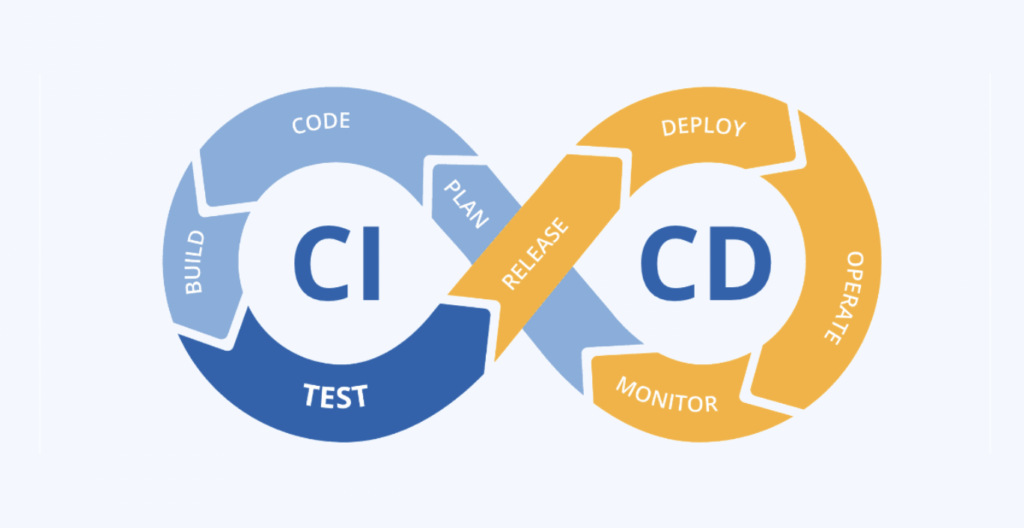
CI/CD for Machine Learning Models

Continuous Integration and Continuous Deployment (CI/CD) are central to DevOps, and they’re equally crucial for MLOps.

Typical ML‑aware CI/CD steps:

  1. Code and Data Checks:
    • Unit tests for data pipelines and model code.
    • Static analysis and security scans.
  2. Model Training and Validation:
    • Automated training on new data or code changes.
    • Evaluation against baselines with quality thresholds.
  3. Staging Deployment:
    • Deploy candidate models to a staging environment.
    • Run integration and performance tests.
  4. Controlled Production Rollout:
    • Blue‑green or canary deployments.
    • Gradual traffic shift with rollback plans.
  5. Post‑Deployment Monitoring:
    • Automated alerts for performance degradation, errors, or drift.

In Singapore, where failures can quickly impact brand reputation and regulatory standing, robust CI/CD helps teams push updates safely and frequently.
Monitoring, Observability, and Model Drift Management

Once models are live, monitoring isn’t optional. It’s your early warning system.

Key metrics to monitor:

  • Technical Metrics:
    • Latency, throughput, error rates, resource usage.
  • Data Metrics:
    • Input distributions, missing values, outliers.
    • Drift between training and serving data.
  • Business Metrics:
    • Conversion rates, fraud detection rates, loan default rates.
    • Any KPI the model is supposed to influence.
  • Drift and Performance Degradation:
    • Statistical drift detectors (e.g., PSI, KS tests).
    • Periodic back‑testing with fresh labelled data where available.

Good MLOps practice sets up dashboards, alert thresholds, and automated triggers for retraining or rollback. For Singapore organisations under strict reporting regimes, this observability also supports audits and incident investigations.

Governance, Risk, and Compliance for AI in Singapore

Scaling AI in Singapore means working within a structured regulatory and governance environment. MLOps can make that manageable instead of painful.

Aligning with PDPA and Data Protection Requirements

The Personal Data Protection Act (PDPA) governs how organisations collect, use, and disclose personal data. MLOps pipelines should:

  • Minimise data collection to what’s necessary for each use case.
  • Ensure consent is obtained and documented where required.
  • Pseudonymise or anonymise data where possible.
  • Log accesses to sensitive datasets and models that process them.
  • Support data subject rights (access, correction, withdrawal of consent) through data lineage and deletion workflows.

Automated processes can help teams prove compliance, rather than scrambling during audits.

AI Governance, Model Documentation, and Audit Trails

AI governance isn’t just about compliance, it’s about building trust with customers, partners, and regulators.

MLOps can support governance by:

  • Maintaining model registries with versions, owners, and approvals.
  • Generating model cards that summarise purpose, data, limitations, and ethics considerations.
  • Capturing audit trails: who changed what, when, and why.
  • Enforcing segregation of duties between developers, reviewers, and operators.

Singapore’s government has published AI governance frameworks to encourage such practices. Aligning with these guidelines early makes it easier to scale AI in Singapore without constant policy friction.

Building High‑Performance MLOps Teams in Singapore

Technology alone won’t scale AI, you need people and processes that fit Singapore’s business culture and talent market.

Roles, Skills, and Cross‑Functional Collaboration

A high‑performing MLOps‑driven AI team typically includes:

  • Data Scientists: modelling, feature engineering, experimentation.
  • Machine Learning Engineers: productionising models, building pipelines.
  • Data Engineers: ingestion, transformation, warehousing, feature stores.
  • DevOps / Platform Engineers: infrastructure, CI/CD, security.
  • Product Owners / Business Analysts: requirements, value tracking.
  • Risk, Compliance, and Legal Stakeholders: governance and approvals.

Key skills:

  • Strong Python or similar languages for ML.
  • SQL and data modelling.
  • Cloud and containerisation basics.
  • Understanding of PDPA and sector‑specific rules.
  • Communication skills to explain technical decisions to non‑technical stakeholders.

In Singapore’s compact ecosystem, partnerships with local universities, polytechnics, and training providers can help close skill gaps quickly.

Culture, Processes, and Change Management

Scaling AI in Singapore also means changing how organisations work:

  • Move from one‑off AI pilots to product thinking, with long‑term ownership.
  • Adopt agile methodologies tailored for data and ML projects.
  • Encourage a blameless culture around incidents and failures.
  • Invest in documentation and internal knowledge bases, not just code.

MLOps gives structure to these cultural shifts. It turns good intentions like “we want responsible AI” into concrete practices and tools.

Measuring ROI and Business Impact of MLOps Initiatives

Investing in MLOps should pay off. To prove it, you’ll need metrics that business leaders care about when scaling AI in Singapore.

Quantitative indicators:

  • Reduction in time from idea to production model.
  • Increased frequency of safe deployments.
  • Decrease in production incidents caused by data or models.
  • Improved model performance and business KPIs over time.
  • Lower infrastructure and operational costs per model.

Qualitative benefits:

  • Higher trust from regulators and customers.
  • Easier audits and less firefighting.
  • Faster onboarding of new team members.
  • Greater reuse of components and best practices.

By treating MLOps as a strategic capability rather than a cost centre, Singapore organisations can sustain AI initiatives instead of letting them stall after early pilots.

Frequently Asked Questions (FAQs)

1. What is MLOps and why is it important for Singapore organisations?

MLOps is a set of practices that combines machine learning, DevOps, and data engineering to manage the entire lifecycle of AI models. It’s important for Singapore organisations because it helps them move beyond pilots to stable, compliant, and scalable AI systems that meet local regulatory and business requirements.

2. How does MLOps help with PDPA compliance?

MLOps helps with PDPA by enforcing data governance across pipelines: tracking lineage, controlling access, automating anonymisation or masking, and documenting how personal data is used in models. This makes it easier to demonstrate compliance and respond to audits or data subject requests.

3. Do we need the cloud to scale AI in Singapore?

Not necessarily. Many organisations use cloud‑native MLOps tools because they’re convenient and scalable, but you can also run MLOps stacks on‑prem or in hybrid setups. The key is having consistent pipelines, monitoring, and governance, regardless of environment.

4. How is MLOps different from traditional DevOps?

DevOps focuses on software applications, while MLOps adds data and models into the mix. Models depend on changing data, require retraining, and can drift over time. MLOps extends DevOps with experiment tracking, feature management, model monitoring, and responsible AI practices.

5. What skills should we build first when starting with MLOps?

Start with strong foundations in data engineering, basic cloud skills, and version control. Then add experiment tracking, CI/CD for models, and monitoring. Complement technical skills with knowledge of PDPA and AI governance principles relevant to Singapore.

6. How long does it take to implement an MLOps platform?

Timelines vary. A minimal, production‑ready setup for a single use case might take a few months. A mature, shared platform serving multiple business units often takes 12–24 months to build, refine, and embed into organisational culture. Starting small and iterating is usually more effective than trying to build everything at once.

Conclusion: A Practical Roadmap to Scaling AI in Singapore

Scaling AI in Singapore is less about chasing the latest algorithm and more about building repeatable, trustworthy systems. MLOps is the practical discipline that makes this possible.

By:

  • Designing end‑to‑end pipelines from data ingestion to monitoring,
  • Selecting tools that match Singapore’s regulatory and infrastructure realities,
  • Embedding governance and PDPA compliance into every step, and
  • Developing cross‑functional teams and a culture of continuous improvement,

organisations can move AI from experimental pilots to dependable production services.

The path isn’t trivial, but it’s achievable. Start with one high‑value use case, implement a modest MLOps pipeline around it, learn from real‑world feedback, and expand. Over time, you’ll build an AI capability that’s not just technically impressive, but also safe, ethical, and aligned with Singapore’s long‑term digital ambitions.

Read More on Sgtrends

Continue Reading
Click to comment

Leave a Reply

Your email address will not be published. Required fields are marked *


Technology

GST Refund in Singapore for Tourists: How to Claim on Electronics Purchases 

Published

on

GST Refund in Singapore for Tourists: How to Claim on Electronics Purchases 

Singapore is one of the world’s top shopping destinations, especially for electronics. From the latest smartphones and laptops to premium cameras and accessories, the country offers a wide range of high-quality tech products at competitive prices. But what makes shopping even more attractive for tourists is the GST refund scheme, which allows visitors to reclaim the tax paid on eligible purchases.

If you’re planning to buy electronics in Singapore, understanding how the GST refund works can help you save a significant amount of money. This complete guide explains everything you need to know from eligibility and rules to step-by-step instructions for claiming your refund.

What Is GST in Singapore?

GST (Goods and Services Tax) is a consumption tax charged on the majority of goods and services in Singapore. From 2026 onward, the GST rate is 9%, and it is already factored into the shelf price of electronics and many other items.

For instance, when you buy a laptop priced at SGD $1,000, a portion of that price represents GST. As an eligible visitor, you may reclaim this tax when departing Singapore through the Tourist Refund Scheme (TRS).

What Is the Tourist Refund Scheme (TRS)?

The Tourist Refund Scheme (TRS) is a government initiative that allows eligible tourists to claim a refund on the GST paid for goods purchased in Singapore and taken out of the country.

The scheme is especially beneficial for travelers purchasing high-value items like:

  • Smartphones
  • Laptops
  • Tablets
  • Cameras
  • Headphones and accessories

By using TRS, tourists can effectively reduce the overall cost of their purchases.

Why Electronics Are Popular for GST Refund

Electronics are among the most commonly refunded items in Singapore and for good reason:

High Value Means Higher Savings

Since GST is a percentage-based tax, higher-priced items like electronics result in larger refunds.

Authentic Products

Singapore is known for selling genuine, high-quality electronics with official warranties.

Competitive Pricing

Compared to many countries, electronics in Singapore are competitively priced, especially when combined with GST refunds.

Who Is Eligible for GST Refund?

Not every traveler qualifies for a GST refund. To qualify, you must satisfy the following requirements:

  • You must be a tourist and not a Singapore citizen or permanent resident
  • You must be 16 years or older
  • You must not have stayed in Singapore for more than 365 days in the past 24 months
  • You must not be employed in Singapore during your visit
  • You must leave Singapore via Changi Airport or Seletar Airport

If you meet all these conditions, you can proceed with the GST refund process.

Minimum Purchase Requirement

To qualify for a GST refund:

  • You are required to spend a minimum of SGD $100 (inclusive of GST)
  • The purchase must be completed at an eligible participating retailer
  • The amount can be combined from up to 3 receipts from the same store on the same day

This makes it easier to reach the minimum threshold, especially when buying accessories along with your main electronic device.

How to Identify GST Refund Stores

Not all shops in Singapore participate in the Tourist Refund Scheme. To ensure your purchase is eligible:

How to Identify GST Refund Stores
  • Watch for signs that say Tax Free Shopping” or “GST Refund Available.
  • Ask the store staff directly before making a purchase
  • Shop at major malls and electronics retailers

Popular shopping areas include:

  • Orchard Road
  • Sim Lim Square
  • Marina Bay Sands

These locations have many stores that participate in TRS.

Step-by-Step Guide to Claim GST Refund

Understanding the process is key to ensuring a smooth refund experience. Follow these steps carefully:

Step 1: Make Your Purchase

When buying electronics:

  • Inform the cashier that you are a tourist
  • Show your passport
  • Ensure the purchase is recorded under the electronic Tourist Refund Scheme (eTRS)

The retailer will link your purchase to your passport electronically.

Step 2: Collect Your Receipt

Always keep:

  • Original purchase receipt
  • eTRS transaction record (usually digital)

Without these, you may not be able to claim your refund.

Step 3: Prepare Before Going to the Airport

Before heading to the airport:

  • Pack your electronics properly
  • Keep high-value items in carry-on luggage
  • Ensure items are unused or minimally used

This is important because customs officers may inspect your purchases.

Step 4: Visit eTRS Self-Help Kiosk

At the airport (usually before check-in or after immigration), locate the eTRS kiosks.

At the kiosk:

  • Scan your passport
  • Review your purchases
  • Submit your refund claim

The system will process your request automatically.

Step 5: Customs Inspection (If Required)

In some cases, especially for expensive electronics, you may be required to:

  • Present the physical items
  • Show receipts
  • Provide your boarding pass

Failure to present items may result in rejection of your refund claim.

Step 6: Choose Your Refund Method

You can receive your refund through:

  • Credit or debit card
  • Cash at the airport
  • Digital wallets

Each method may have different processing times.

Step 7: Receive Your Refund

  • Credit card refunds usually take 7–10 days
  • Cash refunds are immediate (after processing)
  • Digital wallet refunds are often instant

Keep in mind that administrative fees will be deducted, so you won’t receive the full 9%.

Important Rules You Must Follow

To avoid losing your refund, follow these key rules:

Export Timeline

You must leave Singapore with your goods within 2 months of purchase.

Goods Must Be Unused

Electronics should not be heavily used before departure.

Carry Items for Inspection

Always keep items accessible in case customs wants to inspect them.

Services Are Not Refundable

GST on services like warranties, repairs, or installation cannot be claimed.

Common Mistakes to Avoid

Many tourists miss out on GST refunds due to simple mistakes. Avoid these:

  • Not checking if the store participates in TRS
  • Losing receipts
  • Packing items in checked luggage before approval
  • Arriving late at the airport
  • Using the product extensively before departure

Being careful can ensure you don’t lose your refund.

How Much Can You Actually Save?

Let’s look at a simple example:

  • Laptop price: SGD $2,000
  • GST (9%): SGD $180

After deductions, you may receive around SGD $120–$150 as a refund.

While it may not be the full amount, it still represents significant savings especially on high-value electronics.

Best Electronics to Buy in Singapore

If you’re planning to take advantage of GST refunds, here are some popular electronics worth buying:

Smartphones

Latest flagship models are widely available at competitive prices.

Laptops

Ideal for students, professionals, and travelers.

Cameras

Singapore is a great place to buy DSLR and mirrorless cameras.

Audio Devices

Headphones, earbuds, and speakers from top brands are easily available.

Tips to Maximize Your GST Refund

Here are some expert tips to help you get the most value:

Combine Purchases

Buy accessories with your main product to reach the minimum spend.

Shop Smart

Compare prices across different malls before purchasing.

Choose Credit Card Refund

It’s usually the most convenient and secure method.

Allow Extra Time at Airport

Arrive at least 2–3 hours early to complete the process smoothly.

Keep Everything Organized

Store receipts and documents in one place for easy access.

Is GST Refund Worth It?

Absolutely. If you’re buying electronics in Singapore, the GST refund is definitely worth the effort. Even after administrative deductions, you can save a noticeable amount especially on expensive items.

For frequent travelers or tech enthusiasts, this scheme makes Singapore an even more attractive shopping destination.

Final Thoughts

The GST refund process in Singapore is straightforward, efficient, and tourist-friendly. With proper planning and attention to detail, you can easily claim back a portion of your spending on electronics.

Whether you’re purchasing a high-end laptop, the latest smartphone, or premium audio gear, taking advantage of the Tourist Refund Scheme ensures you get the best possible value for your money.

Just remember the key steps: shop at participating stores, keep your receipts, declare your items at the airport, and choose your preferred refund method.

With this guide, you’re fully prepared to shop smart and save more on your next trip to Singapore.

FAQs

Can I claim GST refund on used electronics?

No, items should be unused or minimally used to qualify.

Can I claim GST if I check in my luggage first?

No, you must process your refund before checking in items if inspection is required.

Is there a limit on GST refund?

There is no strict maximum, but high-value claims may require inspection.

Can I claim GST refund after leaving Singapore?

No, the process must be completed at the airport before departure.

Read More on Sgtrends

Continue Reading

Technology

7 Powerful Windows 11 Start Menu Features You Should Be Using Today

Published

on

7 Powerful Windows 11 Start Menu Features You Should Be Using Today

Windows 11’s new Start menu is more than just a visual refresh. It’s a different way of working with your PC, designed to be calmer, cleaner, and a lot more focused. If you’ve just upgraded or you’re thinking about it, understanding the 7 useful things in Windows 11’s new Start menu can help you get the best out of your system every single day.

Instead of live tiles and a busy layout, the new Start menu gives you a simple grid of apps, a smart Recommended section for recent files and programs, and a powerful search box that ties everything together. Whether you’re working from home, running a small business, studying, or just using your PC for everyday tasks, the Start menu is now a central hub that saves you clicks and time.

In the sections below, we’ll walk through each of the seven most useful parts of the Windows 11 Start menu, show you how to use them, and explain how they can fit into your daily routine.

Table of Contents

Understanding the Windows 11 Start menu at a glance

Before we dive into the seven useful things, it helps to understand the big picture. The Start menu in Windows 11 is built around three main zones:

  • Pinned apps at the top
  • Recommended files and apps in the middle
  • The bottom row with your user profile, power options, and a button to open All apps

This simple layout is one reason many users feel less overwhelmed compared to older versions.

If you’re planning to upgrade your device to make the most of Windows 11, be sure to check out our Best Cheap Laptops 2026 – Buyer Guide for budget-friendly options that run it smoothly.

What changed from Windows 10 to Windows 11

If you’re coming from Windows 10, the most obvious changes are:

  • No live tiles: The moving, updating tiles are gone. Apps are now shown as simple icons in neat rows.
  • Centered placement: By default, the Start button and your pinned apps sit in the center of the taskbar, not the left edge.
  • New Recommended section: Instead of showing many tiles, the Start menu highlights your recent documents and apps.
  • Simplified right-click menus: Context menus and Start related actions have cleaner designs.

These changes make the new Start menu feel less like a busy dashboard and more like a focused launcher.

Why the new Start menu matters for everyday users

The goal of the Windows 11 Start menu is simple: get you from “I want to do this” to “I’m doing it now” faster. For everyday users, that means:

  • Finding apps with fewer clicks
  • Opening recent files directly without hunting through folders
  • Using search to jump straight into settings or system tools
  • Customizing the layout so the things you use most are always within reach

Throughout this article, you’ll see how the 7 useful things in Windows 11’s new Start menu all support that goal.

1. Centered design and clean layout make focusing easier

One of the first things you notice after installing Windows 11 is the centered taskbar and Start button. This design change isn’t only about looks; it’s also about comfort and focus.

The new centered taskbar and Start button

By default, the Start button appears in the middle of the taskbar, alongside your pinned and running apps. This has a few practical benefits:

  • Less eye movement: Your eyes naturally rest near the center of the screen, especially on wide monitors. Having Start there means less side-to-side movement.
  • Better for large screens: On an ultrawide or big desktop monitor, reaching the far-left corner can be slightly annoying. The centered Start feels easier to reach.
  • Consistent layout: Because apps open from the center, they often feel more balanced on-screen.

If you’re not a fan of this change, don’t worry you can move Start back to the left, which we’ll cover later.

Cleaner visual hierarchy and less clutter

The Windows 11 Start menu drops the noisy elements from previous versions and sticks to a calm, structured design:

  • No live tiles or animated icons: This reduces visual noise and distractions.
  • Simple grid of icons: Pinned apps appear in neat rows, so scanning the list is faster.
  • Clear separation between Pinned and Recommended: Your brain doesn’t have to guess where things are.

This kind of layout is especially helpful when you’re tired or switching tasks quickly. You can open Start, glance at the screen, and immediately know where to click.

Accessibility and comfort for long work sessions

For users who spend long hours at a PC, including many professionals in Singapore and elsewhere, small design changes can make a big difference:

  • Easier on the eyes: Fewer moving elements and more whitespace reduce strain.
  • Better support for touchscreens: Larger click targets and simple layouts help if you use a 2-in-1 laptop or tablet.
  • Predictable positions: Icons don’t constantly rearrange themselves like live tiles sometimes did.

Over time, this steady, predictable design makes the Start menu feel like a reliable “home base” for all your tasks.

2. Pinned apps: your personal command center

The Pinned section is probably the feature you’ll use most in Windows 11’s Start menu. Think of it as your personal command center—your favorite apps are always in the same place, ready to go.

How to pin, unpin, and rearrange apps

You can shape the Pinned area to match your routine:

To pin an app to Start:

  1. Click the Start button.
  2. Select All apps from the top-right corner of the Start menu.
  3. Find the app in the list.
  4. Right-click the app and select Pin to Start.

To unpin an app:

  1. Open Start.
  2. In the Pinned section, right-click the app icon.
  3. Choose Unpin from Start.

To rearrange apps:

  • Open Start, click and hold on an app icon, then drag it to a new position.
  • Drop it where you want. The other icons shift automatically.

With a little effort, you can build a layout that feels natural and saves real time.

Organizing pinned apps for work, school, and home

Many users switch between roles across the day—worker, student, parent, or gamer. You can arrange pinned apps into “zones” that match these roles:

  • Work zone: Pin tools like Microsoft Teams, Outlook, Excel, and your browser near the top-left.
  • Study zone: Group apps like OneNote, Word, and PDF readers together.
  • Home and entertainment zone: Place Spotify, Netflix, or your favorite games slightly lower down.
  • Tools and utilities: Keep Settings, Calculator, and Snipping Tool in a consistent row so they’re easy to find.

You don’t need labels or folders to do this. Simple positioning creates a mental map you’ll quickly remember.

Practical layouts for productivity and focus

Here’s one example of a practical layout for a typical office or home user:

  • Top row: Edge or Chrome, Outlook, Teams, File Explorer
  • Second row: Word, Excel, PowerPoint, OneNote
  • Third row: PDF reader, Zoom, Calendar, To Do / task app
  • Fourth row: Settings, Photos, Snipping Tool, Calculator

You can of course mix in other apps you use daily, like bookkeeping software or design tools. The key is to keep your most-used apps at the top, where your eyes land first.

Because the Pinned section is so central to how you use Start, it’s one of the 7 useful things in Windows 11’s new Start menu that’s worth customizing early on.

3. All apps view: everything in one predictable place

Even with a well-organized Pinned section, you’ll sometimes need an app that isn’t on your main grid. That’s where All apps comes in.

Opening and navigating the All apps list

To open the full list:

  1. Click the Start button.
  2. In the top-right corner of the Start menu, click All apps.

You’ll now see every installed app, arranged in a simple list.

To jump back to your Pinned view, click the left-facing arrow at the top of the list.

Alphabetical navigation and search shortcuts

In the All apps view, apps are sorted alphabetically and grouped by starting letter:

  • On the right side, you might see quick letter shortcuts (depending on your layout and language).
  • You can scroll or press a letter on your keyboard to jump closer to the app you want.

For instance:

  • Press S on your keyboard to move to apps starting with “S” (like Settings, Spotify, or Steam).
  • Press E to move near Edge or Excel.

If you’re not sure exactly where an app sits in the list, don’t forget that the Start menu has powerful search built-in. Just start typing the app’s name after you open Start.

Keeping the All apps list tidy and manageable

Over time, your All apps list can get crowded, especially if you try lots of software. You can keep it manageable by:

  • Uninstalling apps you never use:
    • Right-click the app in All apps.
    • Select Uninstall (if available).
  • Hiding or removing unwanted shortcuts:
    • Some apps create multiple entries for tools or help files. Focus on the ones you actually need and uninstall extras where possible.

Because All apps is always available, you don’t need to pin everything. Reserve the Pinned section for daily tools and rely on All apps for occasional use.

4. Recommended section: recent files and apps at your fingertips

The Recommended section is one of the most useful and sometimes overlooked parts of Windows 11’s new Start menu. It uses your recent activity to show the files and apps you’re most likely to open next.

How the Recommended section works

You’ll find the Recommended area just below Pinned apps. It shows:

  • Recently opened documents (Word, Excel, PDFs, and more)
  • Recently opened or installed apps
  • Sometimes recommended actions or shortcuts after major updates

Each item includes the file name, the app it opens with, and a small icon.

When you click any of these items, Windows opens it straight away. That means you can:

  • Jump back into a Word report without opening Word first
  • Reopen a school assignment right where you left off
  • Open a photo you edited recently without browsing folders

Using Recommended for faster study and office work

In everyday use, the Recommended section can save a surprising amount of time:

  • Office work:
    • Start your day by clicking Start and choosing the last document you edited, like a proposal or report.
    • No need to navigate through “Documents > Client > 2026 > Project” each time.
  • Studying:
    • Quickly reopen lecture notes or assignments.
    • Switch between your main textbook PDF and your note-taking app.
  • Home use:
    • Get back to a budget spreadsheet, a recipe document, or a recent presentation.

Because it works across apps, Recommended becomes a crossroad for your most important activities.

Privacy controls for your Recommended content

Of course, not everyone wants their recent work showing up front and center, especially on shared PCs. Windows 11 gives you control over what appears there.

To manage this:

  1. Right-click an item in the Recommended list.
  2. Choose Remove from list if you don’t want that specific file to appear again.

For broader control:

  1. Press Win + I to open Settings.
  2. Go to Personalization > Start.
  3. Turn off options such as:
    • Show recently added apps
    • Display your latest files and documents in Start, jump lists, and File Explorer

This way, you can keep the convenience of Recommended without exposing sensitive files, which is especially important if you’re using a shared family PC or a device in a small office.

5. Powerful built-in search integrated into Start

Search has always been important in Windows, but in Windows 11 it’s tightly integrated into the Start experience. When you use the 7 useful things in Windows 11’s new Start menu together, the search box might be the one you rely on most.

Searching apps, files, and settings from one place

You can launch a search in two easy ways:

  • Press the Windows key on your keyboard and just start typing.
  • Or click Start, then click the Search box (or the Search icon on the taskbar).

From there, you can type:

  • The name of an app (e.g., “Excel,” “Photos”)
  • A document title (e.g., “invoice,” “assignment”)
  • A setting (e.g., “Bluetooth,” “display,” “backup”)
  • A control panel item (e.g., “device manager”)

Windows will show results grouped into categories like Apps, Documents, Web, and Settings.

Using filters and shortcuts in Windows search

Once the results appear, you can narrow them down:

  • Use category tabs (such as Apps, Documents, Web) to limit the results.
  • If you only want local files, stay in the Documents or Folders tabs instead of Web results.

Keyboard shortcuts help too:

  • Win + S opens the search interface directly.
  • After you type your query, pressing Enter launches the top result.
  • Use the arrow keys to move up and down the results list, then press Enter to open the selected item.

This becomes second nature very quickly, and it can be much faster than hunting through folders.

Tips to make Start menu search more accurate

To help search work better for you:

  • Use clear file names: For example, “clientA-invoice-Jan2026.xlsx” is easier to find than “new.xlsx”.
  • Let Windows index important folders:
    • Open the Settings app, then navigate through Privacy & security to the Searching Windows section.
    • Choose Enhanced mode if you want broader search across all folders (this uses more resources but finds more files).
  • Pin apps you use daily so they’re already at the top of the Start menu; then you can reserve search for occasional tools and documents.

Search turns the Start menu into a powerful command bar that lets you jump directly to what matters.

6. Customization options: make Start fit your workflow

Windows 11 gives you several ways to customize the Start menu so it matches how you work. You don’t need to leave everything at its defaults.

Moving Start left or center on the taskbar

If you prefer the classic look, you can move the Start button back to the left side:

  1. Right-click an empty space on the taskbar.
  2. Choose Taskbar settings.
  3. Scroll to Taskbar behaviors.
  4. Find Taskbar alignment and choose Left instead of Center.

This simple change can make long-time Windows users feel more at home, while still enjoying the modern Start menu.

Adjusting Start layout: more pins vs. more recommendations

You can choose how much space the Pinned and Recommended sections get:

  1. Open Settings with Win + I.
  2. Go to Personalization > Start.
  3. Under Layout, pick one of these:
    • More pins – gives extra rows to pinned apps, fewer to Recommended.
    • Default – balanced view.
    • More recommendations – shows more recent files, fewer pinned apps.

For example:

  • If you rely heavily on pinned apps and don’t often open older documents, pick More pins.
  • If you constantly jump between documents and projects, More recommendations might serve you better.

Personalization, themes, and Start-related settings

From Personalization > Start, you can also:

  • Show or hide recently added apps
  • Show or hide recently opened items
  • Control whether items appear in Jump Lists and File Explorer

Under Personalization > Colors and Themes, you can:

  • Enable Dark mode or Light mode, which affects Start’s background and contrast.
  • Choose Accent colors that highlight selected items in Start.

These small tweaks help the Start menu feel personal rather than generic, which can make it more pleasant to use every day.

7. Start menu as a hub for accounts, power, and quick actions

At the bottom of the Start menu, you’ll see a bar with your user profile picture, an icon for power, and sometimes quick links to Settings or other options. This small area plays a big role in daily use.

Power options: shut down, restart, and sleep in one click

To access power controls:

  1. Click Start.
  2. In the bottom-right corner of the Start menu, click the Power icon.

You’ll see options like:

  • Sleep – saves power while keeping your session in memory.
  • Shut down – exits your running programs and completely powers off the computer.
  • Restart – turns your PC off and on again, refreshing the system.

Using these from Start keeps things simple and consistent, even if you don’t use any keyboard shortcuts.

Managing user accounts and profiles from Start

On the bottom-left of the Start menu you’ll find your account name and picture. Clicking this gives you actions such as:

  • Change account settings – opens your Microsoft account or local account settings.
  • Lock – locks your PC while keeping your session active.
  • Sign out – closes your session and returns to the sign-in screen.

On shared PCs, especially in homes or small offices, this makes switching accounts much faster:

  • One user signs out from Start.
  • The next user signs in and gets their own personalized Start menu and settings.

Quick access to system settings and productivity features

Alongside your account and power options, the Start menu often shows direct links to important tools like:

  • Settings
  • File Explorer (from the taskbar, just next to Start)
  • Certain system apps you choose to pin

This means that for most routine tasks—changing Wi‑Fi, tweaking display settings, adjusting language options—you can start from the Start menu and reach the right screen in seconds.

Advanced tips: using the Start menu like a power user

Once you’re comfortable with the basics, you can use the Start menu in more advanced ways to boost your productivity.

Keyboard shortcuts that boost Start menu efficiency

Here are some useful shortcuts:

  • Win – open or close the Start menu.
  • Win + X – open the Quick Link menu (fast access to Device Manager, Disk Management, and more).
  • Win + S – open search directly.
  • Win + E – open File Explorer without using Start, keeping your flow smooth.
  • Win + L – lock your PC quickly when stepping away.

Combining these with a well-organized Start layout lets you operate your PC almost entirely from the keyboard if you want.

Combining Start menu with Snap Layouts and virtual desktops

Windows 11 includes Snap Layouts and virtual desktops, which work well with the Start menu:

  • Open an app from Start, then hover your mouse over the Maximize button to see Snap Layouts.
  • Choose a layout (like side-by-side or grid) to organize your workspace.
  • Use Win + Tab to create or switch virtual desktops for different tasks (work, personal, study).

You can then use the Start menu on each virtual desktop to launch related apps, keeping different areas of your life organized.

Managing multiple monitors and Start behavior

If you’re using multiple monitors:

  • You can decide whether the taskbar and Start button appear on all screens or just the main one.
  • Go to Settings > Personalization > Taskbar > Taskbar behaviors to adjust how buttons and icons show on each display.

This is especially useful in offices or home setups with docking stations, where clean, consistent behavior across screens makes daily work smoother.

Common problems and simple fixes for the new Start menu

Even with a polished design, problems can happen. Here are some common Start menu issues and simple ways to fix them.

When the Start button doesn’t respond

If you click Start and nothing happens:

  1. Try pressing the Windows key. If it still doesn’t open, continue.
  2. Press Ctrl + Shift + Esc on your keyboard to open the Task Manager.
  3. Find Windows Explorer in the list.
  4. Right-click it and choose Restart.

If the problem continues:

  • Check for updates:
    • Open the Settings app, head to Windows Update, and apply any updates that are waiting to be installed.
  • Restart your PC fully using Ctrl + Alt + Delete if necessary.

Missing apps or search not showing results

If some apps don’t appear in Start or search doesn’t find files:

  1. Confirm the app is installed:
    • Check in Settings > Apps > Installed apps.
  2. Reinstall the app if needed from Microsoft Store or the original installer.
  3. Rebuild Windows search index:
    • Open the Settings app, go to the Privacy & security section, and then click on Searching Windows.
    • Click Advanced indexing options (if available) and rebuild the index.

Also check that the folders where you store documents are included in the search index options.

Performance tweaks for a smoother Start experience

If the Start menu feels slow:

  • Disable unnecessary startup apps:
    • Open Task Manager (Ctrl + Shift + Esc).
    • Open the Startup apps section and turn off any programs you don’t actually need to run at startup.
  • Turn off some visual effects if your PC is older:
    • In the Start menu, look up Adjust the appearance and performance of Windows using the search bar.
    • Choose Adjust for best performance, or manually select the visual effects you want to enable.
  • Keep your system updated:
    • Settings > Windows Update for security and performance improvements.

These small steps can make opening and using Start feel much snappier.

Also Read:

If your current device is having issues and you’re unsure what to do next, our Singapore Laptop Repair Guide: Pricing, Service Types and Warranty Explained will walk you through all your repair options locally.

FAQs about Windows 11’s new Start menu

FAQ 1: Can I make the Windows 11 Start menu look like Windows 10?

You can’t fully restore the Windows 10 layout with live tiles using only built-in settings. However, you can:

  • Move the Start button to the left (Taskbar alignment).
  • Pin the same apps you used before.
  • Turn off Recommended if you want a cleaner look.

There are third-party tools that try to mimic the Windows 10 Start menu, but using them is a personal choice and may affect stability or future updates.

FAQ 2: How do I stop certain files from showing in Recommended?

To hide individual items:

  1. Open Start.
  2. Right-click the file in Recommended.
  3. Choose Remove from list.

To stop recent items from showing at all:

  1. Go to Settings > Personalization > Start.
  2. Disable the option that displays your recent files in Start, jump lists, and File Explorer.

This is useful on shared PCs, especially in families or small offices in Singapore where privacy matters.

FAQ 3: Why can’t I drag tiles like in Windows 10?

Windows 11 no longer uses live tiles or tile groups. Instead, it uses a grid of simple icons. You can still:

  • Drag icons to reorder them within the Pinned section.
  • Move apps between rows.

But you can’t create resizable tile blocks like before. Microsoft simplified this to keep Start modern, clean, and predictable.

FAQ 4: Is the new Start menu better for touch devices?

Yes, many users find the new Start menu more comfortable on touch devices:

  • The icons are more spaced out and easier to tap.
  • The overall layout is simpler, which reduces accidental taps.
  • Combined with new touch gestures in Windows 11, navigation feels smoother on tablets and 2‑in‑1 devices.

FAQ 5: How do I quickly find system tools from Start?

You can:

  • Press Win, type the tool’s name (e.g., “Device Manager”, “Disk Cleanup”, “Control Panel”), then press Enter.
  • Press Win + X to open the Quick Link menu for many admin tools.
  • Pin frequently used tools to Start from the All apps list for one-click access.

FAQ 6: Does the Windows 11 Start menu work the same on all PCs?

The core design is the same, but small differences can appear:

  • Business or school PCs managed by IT may have some items hidden or pre-configured.
  • Some OEMs (PC manufacturers) may add their apps to your Start layout.
  • Performance can vary depending on your hardware, especially on very old machines.

Still, the key features—Pinned, Recommended, All apps, and Search—work similarly across devices.

Conclusion: Making the most of Windows 11’s new Start menu

The 7 useful things in Windows 11’s new Start menu its centered and calming design, powerful pinned apps area, organized All apps list, smart Recommended section, integrated search, flexible customization, and built-in hub for power and account actions—come together to create a Start experience that’s simpler yet more capable than before.

If you:

  • Arrange your pinned apps thoughtfully,
  • Use Recommended to jump back into important work,
  • Rely on search as your quick “command bar,” and
  • Adjust alignment, layout, and privacy to suit your needs,

you’ll find that the Start menu quietly saves you time every day, whether you’re working, studying, or just relaxing at home.

Take a moment today to open Start, rearrange a few icons, and tweak a couple of settings. With only a small amount of effort, Windows 11’s new Start menu can become a powerful, personalized launchpad for everything you do on your PC.

Read More on Sgtrends

Continue Reading

Technology

5 Essential Skills AI Will Never Replace for Singapore Professionals

Published

on

5 Essential Skills AI Will Never Replace for Singapore Professionals

Table of Contents

Why Human Skills Still Matter in an AI-Driven Singapore

In Singapore, artificial intelligence is no longer a buzzword. It’s quietly running in your banking app, planning bus routes, detecting fraud, and even helping doctors read medical scans. The city-state’s push to become a Smart Nation and an AI hub is strong, and that brings both opportunity and anxiety for working people.

Many Singapore professionals now ask a tough question: Will AI replace my job?
The better question is: which parts of my job can AI do, and which parts will always need a human being?

That’s where the 5 essential skills AI will never replace for Singapore professionals come in. These skills sit at the core of what makes us human:

  1. Emotional intelligence
  2. Complex problem-solving
  3. Ethical judgment
  4. Cross-cultural communication
  5. Creative and strategic thinking

AI can process data at lightning speed and recognise patterns that humans miss. But it can’t truly feel, judge values, read subtle cultural cues, or imagine a new future. In a knowledge driven economy like Singapore’s your long-term career security depends on how well you grow these uniquely human abilities—and how well you combine them with AI tools.

Singapore’s AI ambitions and what they mean for workers

Singapore’s National AI Strategy, launched and updated by the government, sets a clear ambition: embed AI into key sectors like healthcare, transport, logistics, education, and finance. Public agencies and private firms are investing heavily in automation and data.

This has several implications:

  • Routine tasks will be automated
    Data entry, basic reporting, simple call-centre queries, and repetitive admin will continue to be handled by AI and robots.
  • Demand for hybrid human + AI professionals will rise
    Employers won’t just want coders or analysts. They’ll want people who can use AI while making sound human decisions.
  • Soft skills become hard currency
    Emotional intelligence, ethics, and communication skills are no longer nice to have. They’re what separates you from a machine.

In other words, as AI takes over narrow technical tasks, the value of human-centric skills goes up. The 5 essential skills AI will never replace for Singapore professionals are not just a philosophical idea; they’re a practical career strategy.

Understanding the limits of artificial intelligence

To plan your future, you need to understand what AI is good at and where it hits a wall.

AI is excellent at:

  • Crunching huge amounts of data
  • Recognising patterns (images, speech, text)
  • Following clear rules and optimising for set goals
  • Repeating tasks consistently, without fatigue

But AI struggles with:

  • Context: Understanding unspoken rules, local culture, or office politics
  • Values: Choosing between right and wrong when the law is silent
  • Ambiguity: Acting wisely when goals are unclear or conflicting
  • Empathy: Comforting a client, reading a colleague’s mood, or sensing tension
  • Original vision: Defining what future a company, community, or country should aim for

That’s exactly where the 5 essential skills AI will never replace for Singapore professionals sit. Let’s dive into each one, and see how you can sharpen them for the local context.

DON’T MISS: For a deeper look at cutting‑edge AI models, you can also read our in‑depth guide, Deepseek 3.2: The Open-Source AI Model That Outsmarts ChatGPT 5 in Advanced Reasoning Tests.

Skill #1: Emotional Intelligence – The Human Heart of Work

If there’s one line that sums up the future of work, it’s this: “AI can’t care.”
It can simulate caring with friendly chatbots and polite messages, but it doesn’t actually understand how you feel. Emotional intelligence (EQ) is the first of the 5 essential skills AI will never replace for Singapore professionals because every workplace is, at its core, about people.

Why emotional intelligence is irreplaceable by AI

Emotional intelligence is your ability to:

  • Notice your own emotions
  • Manage your reactions
  • Understand how others feel
  • Respond in ways that build trust and cooperation

In a typical Singapore office, you’ll see this in action when:

  • A manager senses her team is burnt out and quietly shields them from extra work
  • A sales executive calms an upset client who just had a shipment delayed
  • A project lead spots tension between two departments and mediates before issues escalate

AI can’t read the subtle mix of Singaporean communication where people often keep a “neutral” face, speak briefly, and avoid open confrontation. It can detect sentiment in text, but it doesn’t experience social pressure, face-saving, or the unspoken “don’t make others lose face” rule.

Workplaces run smoothly when people feel heard, respected, and supported. Emotional intelligence is what makes this possible. That’s why it’s one of the 5 essential skills AI will never replace for Singapore professionals, regardless of sector.

How Singapore professionals can build stronger EQ

The good news: EQ isn’t fixed at birth. You can train it, just like any other skill. Here’s a simple way to break it down:

  1. Self-awareness – Noticing your moods and triggers
  2. Self-management – Choosing your response, instead of reacting on impulse
  3. Social awareness – Reading other people’s emotions and body language
  4. Relationship management – Handling conflicts, giving feedback, inspiring others

A few practical steps:

  • Daily reflection
    At the end of each workday, ask yourself:
    • When did I feel stressed, and why?
    • Did I react in a way I’m proud of?
    • Did I notice anyone else’s emotions?
  • Active listening
    In meetings, try listening without planning your reply. Notice tone of voice, pauses, and body language.
  • Ask for feedback
    Invite colleagues to share how they feel working with you. It might be awkward, but it’s gold for improvement.

Practical EQ techniques for the Singapore workplace

In Singapore’s busy work culture, everyone’s rushing. It’s easy to appear cold or impatient without meaning to. These simple techniques can help:

  • The “two-second pause”
    Before replying to a tough email or WhatsApp message, pause two seconds. Ask, “What’s this person really worried about?” Then address that concern first.
  • Name the emotion
    If a colleague looks frustrated, you might say, You seem a bit stressed everything okay? You’re not prying; you’re showing concern.
  • Cultural sensitivity
    Remember that colleagues from different ethnic and national backgrounds may express emotions differently. Some may be direct; others more reserved. EQ means adapting to each person.

Emotional intelligence is the foundation of leadership, regardless of job title. In a future where AI handles more technical tasks, the ability to lead, comfort, and inspire humans will be one of the 5 essential skills AI will never replace for Singapore professionals.

Skill #2: Complex Problem-Solving in a Fast-Changing City-State

Singapore’s economy moves quickly. New policies, new technologies, new customer expectations—everything’s shifting. Businesses face issues that don’t have neat answers: how to stay competitive, attract talent, go green, or serve an ageing population.

These are complex problems: messy, interconnected, and constantly changing. They’re another of the 5 essential skills AI will never replace for Singapore professionals.

Why AI struggles with messy, real-world problems

AI works best when:

  • The problem is clearly defined
  • There’s lots of historical data
  • The rules of the system don’t change too often

Complex real-world issues, especially in Singapore’s dense and diverse environment, are different:

  • Multiple stakeholders − government, citizens, businesses, NGOs
  • Conflicting goals − profit vs sustainability, speed vs safety
  • Moving targets − regulations, technology, and markets evolve

For example:

  • How should a logistics firm balance fast delivery with carbon reduction targets?
  • How can a hospital manage rising healthcare demand with limited manpower?
  • How should a bank prevent fraud without making customer onboarding painful?

AI can model scenarios and surface patterns, but humans must decide how to frame the problem, interpret results, and balance trade offs. That’s why complex problem-solving is one of the 5 essential skills AI will never replace for Singapore professionals.

Complex problem-solving in key Singapore sectors

Let’s look at a few local contexts:

  • Finance and fintech
    Singapore’s role as a financial hub means complex regulatory and risk decisions. AI can spot suspicious transactions, but compliance officers and risk managers must decide what to investigate, how strict to be, and how to communicate with clients.
  • Healthcare and biotech
    AI can propose treatment plans or flag anomalies in scans. Doctors, nurses, and administrators must weigh patient preferences, cost, ethics, and family dynamics especially in multi-generational households.
  • Transport and logistics
    Route-planning AI can suggest the fastest path, but planners must consider road works, future infrastructure, labour availability, and environmental targets.

In every case, human professionals tackle “what should we do?” rather than just “what can be done?”

A simple framework you can use to tackle complex issues

You don’t need a consulting background to handle complex problems. Try this straightforward framework:

  1. Define the problem clearly
    • Who’s affected?
    • What’s the real pain point?
    • How will we know if it’s solved?
  2. Map the stakeholders
    • Who cares about this?
    • Who has power to block or support?
    • What are their interests?
  3. Break it into smaller parts
    • What can be solved quickly?
    • What needs long-term planning?
  4. Use AI as a tool, not the boss
    • Ask AI to generate options, scenarios, or risks
    • Don’t accept its answer blindly; challenge and refine it
  5. Test, learn, and adapt
    • Run small pilots
    • Collect feedback
    • Adjust your approach

Over time, this way of thinking becomes natural. You’ll be comfortable facing unclear situations, which is exactly what employers want in an AI-rich environment. Among the 5 essential skills AI will never replace for Singapore professionals, complex problem-solving might be your biggest edge in senior roles.

Skill #3: Ethical Judgment and Responsible Decision-Making

As more decisions get automated, one question keeps popping up: “Is this fair?”
Whether it’s hiring algorithms, credit scoring, or surveillance systems, people want to know if technology respects their rights and values. This is where ethical judgment steps in another of the 5 essential skills AI will never replace for Singapore professionals.

The ethical grey areas AI can’t navigate alone

AI optimises for objectives it’s given. If you tell it to maximise efficiency, it’ll do that even if it means cutting corners in ways humans might find uncomfortable.

Some tricky situations:

  • Recruitment
    An AI system might favour candidates from certain schools because past hires from there performed well. But this could disadvantage equally capable candidates from other backgrounds.
  • Customer profiling
    A bank’s AI might flag certain demographic groups as higher credit risks, even if individuals are responsible. Is it acceptable to treat them differently?
  • Employee monitoring
    AI tools can track staff activity to boost productivity. How much monitoring is too much? Where’s the line between management and intrusion?

AI can’t answer these questions because it doesn’t hold values. It doesn’t understand justice, dignity, or social harmony. Ethical judgment is central to the 5 essential skills AI will never replace for Singapore professionals because only humans can balance law, culture, and conscience.

Building your personal ethics compass as a professional

Ethical judgment isn’t about memorising rules; it’s about developing a moral compass you can rely on when rules are vague. You can use a simple three-part test:

  1. Legal: Is it within the law and company policy?
  2. Fair: Is it fair to everyone involved, especially those with less power?
  3. Transparent: Would I be comfortable if this decision appeared on the front page of a major Singapore news site?

If any answer is “no” or “I’m not sure,” slow down and seek more input.

You can also:

  • Study your industry’s professional codes (for example, for accountants, engineers, or healthcare workers)
  • Discuss ethical cases with colleagues over lunch or in team learning sessions
  • Reflect after difficult decisions: “If I had to decide again, would I do the same?”

Ethics in action: Singapore case examples

Consider a few local-style scenarios:

  • HR in a large local company
    You’re asked to use an AI tool to shortlist CVs. You notice it keeps ranking foreign candidates lower, though they’re qualified. You raise the issue, investigate biases in the data, and propose adjustments to ensure fairer hiring.
  • Product manager at a fintech startup
    Marketing suggests nudging users into taking larger loans through “one-click top-ups”. You highlight the risk of over-borrowing and insist on clearer warnings and budgeting tips within the app.
  • Operations manager in a logistics firm
    A new scheduling AI reduces costs but forces drivers into unrealistic timetables, risking safety. You adjust business rules so it factors in rest times and traffic unpredictability.

In all these examples, the AI is powerful but humans provide the conscience. That’s why ethical judgment is firmly among the 5 essential skills AI will never replace for Singapore professionals.

Skill #4: Cross-Cultural Communication in Multiracial Singapore

Singapore is famously multicultural: Chinese, Malay, Indian, Eurasian, and many other communities live and work side by side. On top of that, thousands of professionals come from the region and beyond. Navigating this mix smoothly is another of the 5 essential skills AI will never replace for Singapore professionals.

Why culture-savvy communication beats any algorithm

Communication is more than words; it’s culture, history, and identity. AI translation and chat tools can help with language, but they don’t fully grasp:

  • When to be direct and when to be subtle
  • How hierarchy affects what can be said
  • What counts as respectful or rude in different cultures

In a Singapore meeting room, you might have:

  • A senior local manager who prefers modest, understated speech
  • A younger colleague from overseas who’s more outspoken
  • A regional stakeholder dialing in from another country with different norms again

Reading the room, choosing the right tone, and building rapport in this complex setting is very human work.

That’s why cross-cultural communication stands out among the 5 essential skills AI will never replace for Singapore professionals. It’s essential for:

  • Leading diverse teams
  • Negotiating with regional partners
  • Serving customers from many backgrounds
  • Avoiding misunderstandings that can quietly damage trust

Practical ways to improve cross-cultural communication skills

You don’t need to be an anthropologist. Small, consistent habits go a long way.

  1. Be curious, not judgmental
    If a colleague behaves differently from what you expect, ask (respectfully) about their background rather than labelling it as “weird” or “wrong”.
  2. Learn basic phrases and customs
    Knowing how to say “thank you” or understanding major religious holidays shows respect.
  3. Clarify, don’t assume
    When instructions cross cultures, check understanding: “Just to be sure we’re aligned, can you share how you understood the plan?”
  4. Watch non-verbal cues
    Eye contact, silence, and body language have different meanings across cultures. In Singapore, silence can mean “I disagree but don’t want to confront you” just as easily as it means “I’m thinking.”

Navigating Singaporean style communication in the workplace

Local communication has its own flavour:

  • Indirect disagreement
    People may say, “Can, but maybe later,” or “We see some challenges,” instead of “No.” Learning to decode—and use—this style respectfully is vital.
  • Respect for hierarchy
    Many still defer strongly to seniority. If you’re leading a meeting, you might need to encourage junior staff explicitly: “We really want to hear your view.”
  • Mix of Singlish and formal English
    In informal chats, colleagues may slip into Singlish. Deciding when to keep it light and when to stay formal is part of cross-cultural intelligence.

AI doesn’t understand “lah,” “can or not,” or the subtle warmth in “ok, can.” But you do or you can learn. This blend of local nuance and international etiquette is one more reason cross-cultural communication belongs in the 5 essential skills AI will never replace for Singapore professionals.

Skill #5: Creative and Strategic Thinking for Long-Term Value

AI can generate endless variations of designs, copy, or code. Yet, it still struggles to answer big questions like:

  • Where should our company be in five years?
  • What new value can we create for Singapore and the region?
  • How do we stand out from competitors using the same AI tools?

This is where creative and strategic thinking come in, rounding out the 5 essential skills AI will never replace for Singapore professionals.

How human creativity complements AI’s analytical power

AI is great at remixing existing ideas. It learns from past data. But true creativity often means:

  • Challenging assumptions
  • Connecting ideas from very different fields
  • Imagining what doesn’t exist yet

Think about:

  • A logistics company using AI data to design eco-friendly delivery routes and new green branding
  • A hospital combining AI diagnostics with community outreach ideas to better serve elderly residents
  • A local SME using AI to personalise offerings while creating a uniquely Singaporean customer experience

In each case, AI is a powerful assistant. But the original concept, the what if we tried this? moment, comes from humans.

Strategic thinking in an AI-augmented economy

Strategic thinking means looking beyond short-term wins. It asks:

  • What trends are coming to Singapore and ASEAN in 3–10 years?
  • How will regulations, technology, and demographics evolve?
  • Where do we have an edge that AI can’t easily copy?

For example, you might:

  • Position your firm as the most trusted, ethical user of AI in your industry
  • Design roles that emphasise high-touch, personalised service supported by AI tools
  • Target niche markets where local knowledge and relationships matter more than raw efficiency

Strategic thinking is especially important in leadership and management roles. AI can support strategy with data and forecasts, but only humans decide which future is worth pursuing.

Simple habits to strengthen your creative muscles

You don’t need to be an artistic person to think creatively. In fact, creativity is like a muscle you can train. Try these simple habits:

  • Ask “why” and “what if” more often
    When you see a process, don’t just accept it. Ask, “Why do we do it this way? What if we tried another approach?”
  • Collect ideas outside your field
    Read about other industries, countries, or hobbies. Often, a solution from one area sparks innovation in another.
  • Use AI as a brainstorming partner
    Let AI generate lists of possibilities. Then you pick, combine, and refine. You’re the director; AI is the assistant.
  • Schedule thinking time
    Even 30 minutes a week to reflect on longer-term questions can sharpen your strategic instincts.

In a region where many companies will use similar AI tools, human creativity and strategy become key differentiators. That’s why creative and strategic thinking are core parts of the 5 essential skills AI will never replace for Singapore professionals.

Integrating AI with Human Skills: Augment, Don’t Compete

Once you recognise the 5 essential skills AI will never replace for Singapore professionals, the goal isn’t to reject AI. It’s to combine your human strengths with AI’s capabilities.

From fear to partnership: Working with AI tools

Instead of asking, “Will AI take my job?” flip the question:

How can AI take over the boring parts of my job so I can focus on higher-value human work?

Some examples:

  • A lawyer uses AI to draft initial contract templates, then spends more time on client advisory and negotiation.
  • A marketing executive uses AI analytics to understand customer behaviour, then focuses on creative campaign ideas.
  • A teacher uses AI to mark basic quizzes, then invests extra time in mentoring students who struggle.

This mindset shift moves you from competition to collaboration. Your career becomes more future-proof because you’re not just doing what AI can do faster; you’re doing what AI cannot do at all.

Building your personal “human + AI” skills stack

Think of your skills in two layers:

  1. Human core – The 5 essential skills AI will never replace for Singapore professionals:
    • Emotional intelligence
    • Complex problem-solving
    • Ethical judgment
    • Cross-cultural communication
    • Creative and strategic thinking
  2. AI fluency – Basic comfort with:
    • Using AI tools (chatbots, data dashboards, automation software)
    • Asking AI clear questions and checking its answers
    • Understanding AI’s limits and when to override it

You don’t have to be a data scientist to understand and work confidently with AI.. You just need to be:

  • Curious enough to try new tools
  • Critical enough to question output
  • Confident enough to make the final call

When you blend your human core with AI fluency, you become exactly the kind of professional Singapore employers want adaptable, thoughtful, and future-ready.

FAQs About AI and the Future of Work in Singapore

FAQ 1: Will AI really take away most jobs in Singapore?

AI will change most jobs, but it’s unlikely to remove most of them. Tasks within jobs will shift: routine, repetitive activities will be automated, while roles that rely on the 5 essential skills AI will never replace for Singapore professionals like emotional intelligence and ethical judgment will grow in importance. Some roles may disappear, but new ones will also emerge in AI management, oversight, and human-centred services.

FAQ 2: Which industries in Singapore are safest from AI disruption?

No industry is completely “safe,” but sectors that depend heavily on human interaction and judgment are more resilient. These include:

  • Healthcare and social services
  • Education and training
  • Leadership and management roles across industries
  • Creative industries, branding, and certain areas of marketing
  • Complex B2B sales and relationship management

In all of these, the 5 essential skills AI will never replace for Singapore professionals are central to daily work.

FAQ 3: How can mid-career professionals stay relevant?

Mid-career professionals should focus on two areas:

  1. Strengthening the 5 essential skills AI will never replace for Singapore professionals especially leadership, communication, and complex problem-solving.
  2. Gaining AI fluency: learning to use AI tools relevant to their field (for example, CRM analytics in sales, or AI-assisted design in creative roles).

You can start small: take short online courses, attend employer-sponsored training, or join community learning sessions. The key is to show you’re adaptable and open to change.

FAQ 4: Do I need to learn coding or data science to work with AI?

Not necessarily. For most roles, you don’t need to code. What you need is:

  • A simple grasp of both the abilities and limitations of AI
  • Comfort using AI-powered software in your daily work
  • The ability to ask good questions and interpret AI-driven insights

If you’re excited by tech, learning coding can open more doors. But even without it, your focus should be combining AI tools with the 5 essential skills AI will never replace for Singapore professionals.

FAQ 5: How can fresh graduates prepare for an AI-heavy job market?

Fresh graduates in Singapore can:

  • Build a strong foundation in the 5 essential skills AI will never replace for Singapore professionals through internships, group projects, and co-curricular activities
  • Learn to use AI tools for research, writing, data analysis, or design
  • Seek mentors in their desired industry to understand how AI is changing work
  • Choose modules or short courses that cover digital literacy, data basics, and innovation

Employers will look not only at grades but also at how you collaborate, communicate, and adapt.

FAQ 6: What government support exists in Singapore for upskilling?

Singapore offers multiple support schemes, including:

  • SkillsFuture Credit for individual learning
  • Mid-Career Enhanced Subsidy for those above a certain age
  • Company training grants to encourage employers to upskill staff

Many of these programmes include courses on AI, data analytics, and soft skills. They’re a practical way to strengthen both your technical and human capabilities, especially around the 5 essential skills AI will never replace for Singapore professionals.

Conclusion: Future-Proofing Your Career with Skills AI Will Never Replace

AI is transforming Singapore’s economy, but it’s not the whole story. Beneath every algorithm, there are humans:

  • Deciding what problems to solve
  • Choosing what values to uphold
  • Communicating across cultures
  • Comforting clients and colleagues
  • Imagining new futures for businesses and communities

That’s why the 5 essential skills AI will never replace for Singapore professionals are so powerful:

  1. Emotional intelligence
  2. Complex problem-solving
  3. Ethical judgment
  4. Cross-cultural communication
  5. Creative and strategic thinking

These are the skills that keep work human. They turn you from a task-doer into a trusted professional, leader, and partner someone AI can support, but never truly replace.

The path forward isn’t to fight AI, nor to fear it. It’s to embrace AI as a tool while doubling down on what makes you uniquely human. If you keep learning, stay curious, and intentionally grow these five capabilities, you’ll not only stay relevant in Singapore’s AI-driven future you’ll help shape it.

Read More on Sgtrends

Continue Reading

Trending

Copyright © 2026 Singapore Trends | Email: support@sgtrends.org